Your organic traffic just took a nosedive and you’re probably freaking out right now. We totally get it – watching your search rankings disappear feels like watching your bank account drain.
But here’s reality: panic won’t bring back those visitors.
After auditing hundreds of sites with traffic drops, we’ve created this 8-step Semrush audit process that actually works.
No fancy theories or complicated jargon – just a proven method to diagnose exactly what’s killing your search visibility and organic performance.
Before we jump in though, here’s something that’ll make this whole process easier: you can grab 17% OFF on Semrush annual plans plus an exclusive 14-day free trial with our special partner link.
Trust me, you’ll need these tools to properly diagnose what’s happening with your site.
🤔 Why Organic Traffic Drops Happen (And Why You Shouldn’t Panic)

Before we look at the specifics of diagnosing SEO issues, let’s quickly cover why these drops occur in the first place. Understanding the “why” makes the fix much clearer.
Common causes include:
The key thing to remember is that most traffic drops aren’t permanent death sentences – they’re problems waiting to be solved.
🪜 The 8-Step Semrush Traffic Audit Process
This audit process will help you identify exactly what’s causing your organic search visibility to tank. Each step builds on the previous one, so don’t skip ahead – trust the process.
Confirm the Drop with Organic Research
First things first – you need to confirm that what you’re seeing is actually a real organic traffic drop and not just a tracking glitch or seasonal variation.
Head over to Semrush Organic Research and enter your domain. Click on the “Overview” report, then select the “Traffic” tab. Set your date range to cover at least 6 months so you can spot patterns and pinpoint exactly when the drop started.

What to look for:
This step gives you the foundation for everything else. You can’t fix what you can’t measure, and Semrush’s historical data will show you exactly when things went south.
Check Position Tracking for Keyword Rankings
Now that you’ve confirmed the drop, it’s time to see which keywords took a beating. Fire up Semrush Position Tracking – this tool is absolutely crucial for understanding ranking changes.
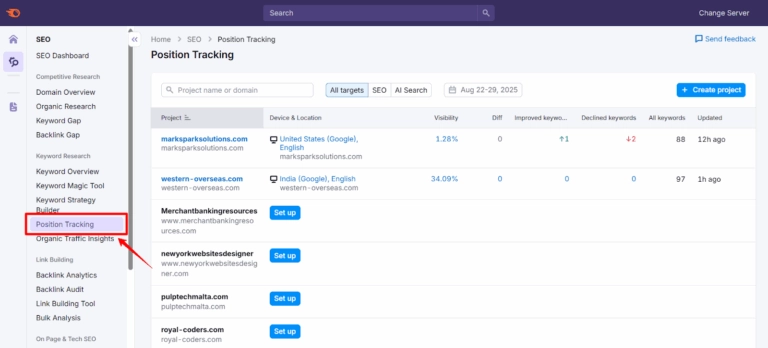
If you haven’t set up position tracking yet, create a new project with your domain and add your most important keywords. The tool tracks daily rankings across different devices and locations, which is exactly what you need right now.
Head to the “Position Changes” tab and set your date range to include the period when your traffic dropped. Click the “Changes on SERP” filter to isolate keywords that lost rankings.
Key things to examine:
This step often reveals the smoking gun – you’ll likely see a clear pattern of ranking declines that corresponds to your traffic loss.
Run a Complete Site Audit
Technical SEO problems are sneaky little devils that can tank your organic traffic overnight. Semrush Site Audit is your best friend for catching these issues.

Set up a comprehensive site audit that crawls your entire website (or at least your most important pages). The tool will check over 140 different SEO factors, from basic stuff like broken links to complex technical issues like crawlability problems.
Critical areas to focus on:
The beauty of Semrush Site Audit is that it prioritises issues by severity, so you know exactly what to fix first.
Don’t try to tackle everything at once – focus on the high-impact problems that could be causing your traffic drop.
Examine Content Quality and Relevance
Here’s where things get a bit more subjective, but it’s absolutely critical. Google’s recent algorithm updates have put massive emphasis on content quality and user satisfaction.
Use the Organic Research tool to identify which pages lost the most traffic. Then, manually review these pages and ask yourself some tough questions:
Content audit checklist:
Sometimes, what used to be great content becomes outdated or no longer matches what searchers want. If you find content that’s clearly behind the competition, you’ve likely found part of your problem.
Investigate Backlink Profile Changes
Your backlink profile can make or break your organic traffic. Sudden losses of high-quality backlinks or an influx of spammy links can both cause ranking drops.
Use Semrush Backlink Analytics to examine your link profile. Look for:

Red flags in your backlink profile:
Compare your current backlink profile to how it looked before the traffic drop. If you spot significant changes, this could be a major factor in your ranking decline.
Analyse Competitor Movements
Sometimes your traffic drop isn’t because you’ve done something wrong – it’s because your competitors have stepped up their game. This is particularly common in competitive niches.

Use Semrush’s competitor analysis features to see what’s happening in your space:
Competitor intelligence gathering:
The Keyword Gap tool in Semrush is brilliant for this – it shows you exactly which keywords your competitors rank for that you don’t. Sometimes, the “problem” isn’t technical at all – you’ve just been outcompeted.
Check for Manual Penalties and Security Issues
This step is straightforward but crucial. Log into Google Search Console and check the “Manual Actions” section. If Google has slapped you with a manual penalty, this will show up here with details about what you need to fix.
Also check the “Security Issues” section – if Google thinks your site is compromised or serving malware, they’ll tank your rankings faster than you can say “organic traffic drop.”
What to look for:
Most sites won’t have manual penalties, but it’s worth checking because if you do have one, nothing else matters until you fix it.
Cross-Reference with Google Algorithm Updates
Finally, go back to that timeline view in Semrush Organic Research and really examine the correlation between your traffic drop and known algorithm updates.
Google pushes out hundreds of small updates each year, plus several major ones. Some of the big ones that commonly cause traffic drops include:

Major algorithm updates to be aware of:
If your drop correlates with a known update, research what that specific update targeted. This gives you clear direction on what needs fixing.
🤷♂️ Why Semrush Makes This Process So Much Easier

Look, you could try to do this audit with free tools, but honestly, you’d be making life much harder for yourself. Semrush brings everything together in one platform, with historical data that’s essential for diagnosing when problems started.
The Site Audit tool alone can save you hours of manual checking, and the Position Tracking gives you the kind of detailed ranking data that’s impossible to get elsewhere.
Plus, the Organic Research historical data is pure gold when you’re trying to pinpoint exactly when things went wrong.

Get 17% Off Semrush Annual Subscription for Big Savings
exclusive
Pay less for a yearly subscription and save 17 percent while getting access to powerful SEO and marketing tools for your business.
17% Off

Stay Updated with Us
⏰ Time to Stop Guessing and Start Fixing
Traffic recovery isn’t magic – it’s methodical detective work. Following this 8-step audit beats random guessing every time. Recovery typically takes 4-12 weeks once you fix the root cause, so patience is key.
Remember, every day you wait is another day your competitors gain ground. Slash 17% off Semrush annual plans plus a 14-day free trial with our exclusive link and start your audit today.
Your organic traffic won’t fix itself – but will you take action to save it?
🚀 Get Exclusive Affiliate Marketing Secrets🚀
Discover the strategies, tools, and tactics used by the top 1% of affiliate earners!

Join 69,572+ Affiliates already leveling up their game
Affiliate Disclosure: This post may contain some affiliate links, which means we may receive a commission if you purchase something that we recommend at no additional cost for you (none whatsoever!)